dhowlab
العربية Start a project

You are reading the simple view: the same content with no 3D or animation.

The software your operation runs on, built in Qatar.

Dhow Lab designs and builds operational systems, web and mobile apps, and AI workflows. We find the bottleneck that is costing your team hours, then replace it with software that people actually use.

Start a project See what we have shipped

systems running in production today
5+
WhatsApp messages handled by our systems
23,000+
AI-proposed changes reviewed and approved by people
48,194
match days staffed through one platform
300+

Sound familiar?

Most operations do not have a software problem. They have five small ones that nobody has had time to fix.

This is the work we take away.

What we build*

One team for the whole job: understanding the operation, designing the product, writing the code and keeping it running.

  1. The system your team works in all day: guest lists, staffing, hiring, approvals, payouts. Built around how you really operate.

    • Roles and permissions
    • Full audit trail
    • Excel and PDF exports
  2. We sit with your team, find where the hours go (retyping, chasing, reconciling spreadsheets) and automate that step first.

    • Process mapping
    • One fix at a time
    • Measured before and after
  3. Fast, secure web apps and customer portals that work as well on a phone as on a desk.

    • Arabic and English
    • Right-to-left done properly
    • Light and dark
  4. iOS and Android apps for teams in the field, including apps that keep working without signal and sync when it returns.

    • iOS and Android
    • Works offline
    • Push notifications
  5. AI that reads documents, messages and photos, then proposes the change for a person to approve. Useful, measured and never left unsupervised.

    • Document and photo reading
    • Human approval built in
    • Cost tracked per call
  6. Your systems talking to each other, and to the tools your people already use.

    • WhatsApp and email
    • Calendars and e-signing
    • Devices, even smart glasses

Selected work

A few of the systems we have built end to end, shown with demo data. The numbers are from real use.

Food and beverage

Wagfa: drive-up ordering for cafes

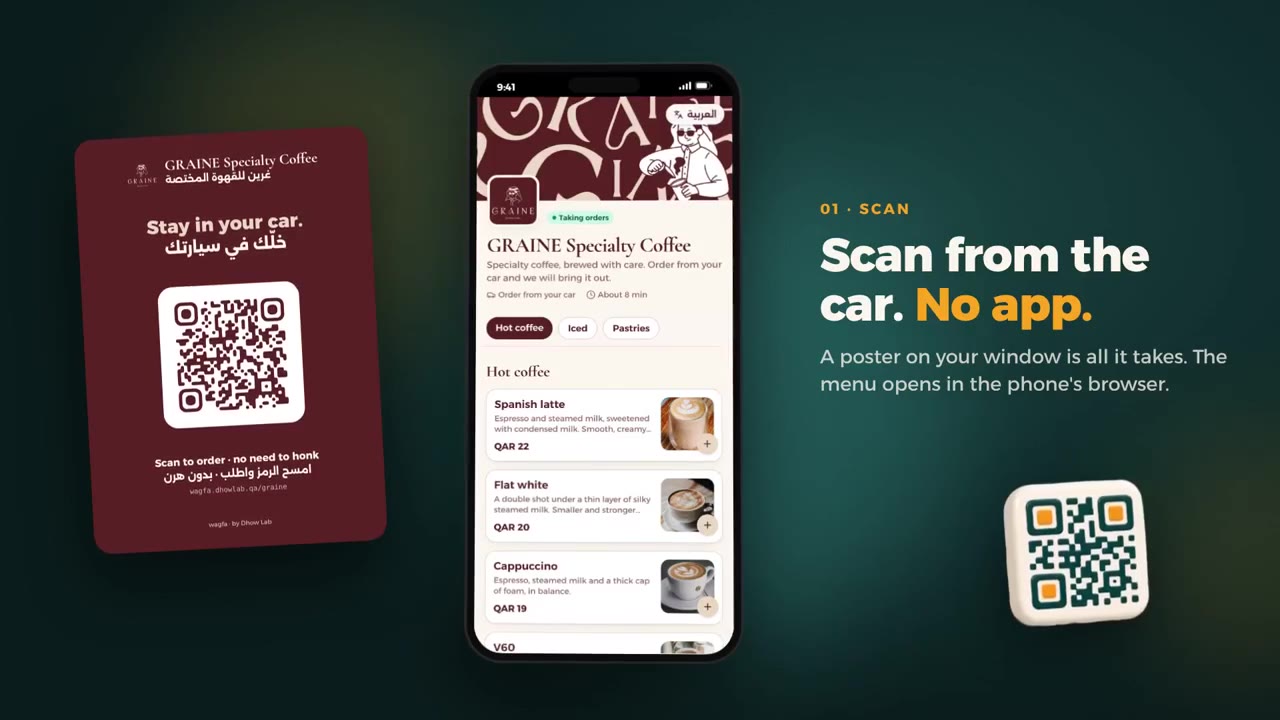
Customers order from their car by scanning a QR code. The order rings on the cafe's screen until someone picks it up.

apps for the customer to install
0
languages, laid out correctly in both directions
2
levels of menu access per vendor
3
data models behind it
26

Visit Wagfa

Events and government

Guest arrivals for state events

One live guest list for thousands of delegates, kept current by AI that reads every message, letter and passport photo.

guests from 137 nationalities
3,539
arrivals and departures on 1,818 flights
5,323
WhatsApp messages read by AI
9,972
AI-proposed changes applied after review
48,194

Sports operations

Match-day workforce platform

From a WhatsApp invitation to a verified, contracted and paid steward at the gate, with no app to install.

WhatsApp messages sent
13,288+
matches run
300+
staff managed
150+
WhatsApp message templates
33

People and hiring

Hiring system, from job post to signed offer

A careers site and one workspace that takes a company from a published job to a signed offer.

pipeline stages
10
email templates, every send audited
19
form field types per job
13
applicants per export
2,000

Food and beverage

Wagfa: drive-up ordering for cafes

Our own product: customer ordering, vendor dashboard and admin console

Visit Wagfa: wagfa.dhowlab.qa

The problem

Outside cafes in Qatar, customers honk from their cars. A member of staff walks out to take the order, walks back to prepare it, and walks out again. Orders get missed, and the street gets louder.

What we built

A customer parks, scans the QR code on the window and orders from the full menu without installing anything. The order rings on the vendor's screen until someone acknowledges it, the team prepares it and walks it out once, and the customer follows every step on their phone. Behind it sit a vendor dashboard, a guided application for new vendors, subscription billing and an admin console for our team.

apps for the customer to install
0
languages, laid out correctly in both directions
2
levels of menu access per vendor
3
data models behind it
26

Built and run by Dhow Lab. Counts are taken from the system itself. 26 data models and about 12,000 lines of TypeScript, covered by unit and integration tests.

  • Next.js
  • React
  • TypeScript
  • PostgreSQL
  • Prisma
  • better-auth
  • Resend
  • Cloudflare R2
  • Live updates

What is in it

For the customer
  • Scan the QR code on the window; the menu opens in the phone's browser with nothing to install
  • The full menu in Arabic and English, with photos, sizes, options and a note for the staff
  • They say which car is theirs: a plate number, or just the colour and type
  • Live order tracking on the phone, step by step, until it reaches the car
For the counter
  • New orders ring until a member of staff acknowledges them
  • A live board that updates by itself: accept, prepare, on the way, delivered
  • Runs in the browser on the computer or tablet the shop already has
  • Order history with search, and insights on what sells and when
Menu control
  • Mark any item sold out in one tap
  • The team sets each vendor's menu access to locked, limited or full, switch by switch
  • Every menu change is checked on the server, saved to history and can be restored
  • A preview in a phone frame before customers see a change
Branding
  • Each vendor's own three colours and fonts on the menu, tracking page and poster
  • Hard-to-read colour combinations are corrected automatically
  • A QR poster studio with the vendor's logo, sized to scan from a car
Onboarding and billing
  • Vendors apply through a guided wizard with their documents and location
  • Plans, custom prices, free trials and promo codes
  • Invoices numbered and issued automatically, with part payments by cash, transfer or gateway
  • Ordering pauses by itself when a subscription lapses
Trust and control
  • An optional location check so only customers parked outside can order
  • Prices and totals are always rebuilt on the server, never trusted from the phone
  • Every change records who, what, before and after
  • Three team roles and three vendor roles, each with their own permissions

Features listed here were built for this specific system. What we build for you is set out in your own contract.*

Events and government

Guest arrivals for state events

Operations system, web, iOS and smart glasses

The problem

Thousands of delegates land within a few days. Their details arrive as ministry letters, spreadsheets, emails and a constant stream of WhatsApp messages, and keep changing until the aircraft door opens.

What we built

One live guest list for the operations room, a phone app for the airport team that works offline, and a glanceable view on smart glasses at the kerb. AI reads every incoming message, letter and passport photo, works out which guest it concerns and proposes the change. A person approves it; the system updates the list, tells the team and keeps the history.

guests from 137 nationalities
3,539
arrivals and departures on 1,818 flights
5,323
WhatsApp messages read by AI
9,972
AI-proposed changes applied after review
48,194

In production for 49 days across 7 events, used by 18 staff. About 121,000 lines of code across a web app, an iOS app and a smart-glasses app, covered by 720 automated tests.

  • Next.js
  • React
  • TypeScript
  • PostgreSQL
  • Claude
  • Flutter
  • WhatsApp
  • Live flight data

What is in it

Operations room
  • The next 24 hours of arrivals and departures on departure-board panels
  • A guest list of thousands of rows that edits like a spreadsheet, with saved views, grouping and colour rules
  • Warnings for clashing flight times, duplicates and companions travelling without their principal
  • Bulk edit, merge guests, assign handlers and message them in one step
AI reading
  • Reads the team's WhatsApp groups in Arabic and English, including edits and replies
  • Every proposed value quotes the exact words it was read from
  • Passports, tickets and bag tags read from photos and matched to the right guest
  • Approve, edit, reject or undo each field
Imports and sources
  • Excel, CSV, PDF, Word, email and photos
  • Sources are ranked: a signed letter outranks a sheet, which outranks a chat message
  • Real conflicts shown side by side; a blank cell never clears a field
Flights
  • Each flight confirmed against the airline, then followed from the airport board and live aircraft positions
  • Scheduled messages to each handler before a flight
  • Group reminders for guests not yet marked as received
In the field
  • iOS app with the whole list cached; changes queue offline and replay in order
  • One tap to mark a guest arrived; passport scanning at the gate
  • A glanceable board on smart glasses
  • An installable field web app, with nothing to download
Control and audit
  • Every save is one change set with field-level history and undo
  • 36 permissions across organisation and event roles
  • PDF and Excel exports in Arabic, right-to-left, with changes highlighted
  • Usage and cost tracked per event

Features listed here were built for this specific system. What we build for you is set out in your own contract.*

Sports operations

Match-day workforce platform

Arabic-first web platform, delivered over WhatsApp

The problem

Staffing a stadium means inviting, verifying, contracting, placing and paying hundreds of people, match after match. It was run on phone calls and spreadsheets.

What we built

Staff never install an app. Everything reaches them on WhatsApp and every step is one tap: log in, complete a profile, sign the season contract with a finger, accept a match. AI checks ID and bank documents against what was typed and flags mismatches for a person. Supervisors plan every post at every gate, and payouts and reports follow from the same record.

WhatsApp messages sent
13,288+
matches run
300+
staff managed
150+
WhatsApp message templates
33

In production today. Thirteen modules behind three roles. Thirteen modules, 73 API endpoints and about 70,000 lines of TypeScript.

  • Next.js
  • React
  • TypeScript
  • PostgreSQL
  • WhatsApp API
  • Vision AI and OCR

What is in it

Onboarding
  • A supervisor enters a name and a number; the person gets a WhatsApp invitation
  • Passwordless login with a one-time code sent on WhatsApp
  • Self-service profile in Arabic and English: ID, bank details and accreditation
  • Targeted update requests: the person sees only the fields that need fixing
AI document check
  • OCR and a vision model read the ID and bank certificate independently
  • Readings are compared with what was typed; mismatches are flagged for a person
  • Admin approves everything, approves some fields, or rejects with a one-click reason
Contracts
  • Secure signing link with a live preview of the contract
  • The person signs with a finger on their phone
  • The signed Arabic PDF is generated on the server and sent back on WhatsApp
  • A contracts desk with live counters and exports
Planning a match
  • Stadiums with named posts and the headcount each one needs
  • Assignment by post; people already working that day cannot be double-booked
  • Match status moves on its own as staff confirm and kick-off passes
Match day
  • One-tap acceptance page with the map, the supervisor's contact and add-to-calendar
  • Scheduled reminders to every confirmed person and the full roster to the supervisor
  • A live crowd counter that several people can run at once
  • A personal calendar feed for Google, Apple and Outlook
Pay and reports
  • Attendance invoice as an Arabic PDF with names, IDs and amounts
  • Incentive tracking per match and in bulk, with a WhatsApp notice
  • A season matrix of staff against matches, exportable to Excel
  • A report builder with chosen columns, plus a complete audit trail

Features listed here were built for this specific system. What we build for you is set out in your own contract.*

People and hiring

Hiring system, from job post to signed offer

Careers site and hiring workspace

The problem

Hiring lived in inboxes and spreadsheets: CVs in email, interview times agreed over a dozen messages, documents collected by hand.

What we built

A branded careers site and one workspace for the hiring team. Every applicant sits on a pipeline board with an AI first read of the CV, team votes and discussion. Candidates pick an interview slot that is free on every interviewer's calendar and upload documents through private links, with no account to create.

pipeline stages
10
email templates, every send audited
19
form field types per job
13
applicants per export
2,000

Counts are taken from the system itself. Roles are data, not code: 20 permissions evaluated at runtime, deny by default.

  • Next.js
  • React
  • TypeScript
  • PostgreSQL
  • Google Calendar
  • AI CV screening

What is in it

Careers site and applying
  • A branded careers home with live roles, teams and locations
  • A form for each job, built from 13 field types
  • CVs upload straight to private storage, with type and size limits
  • Captcha, a honeypot field and rate limits on every submission
Job management
  • Draft, open, closed and archived states, with a staff-only preview
  • A Markdown editor with AI that drafts the description from a short brief
  • A form builder with an AI helper that adds or rewrites questions
  • Collaborators per job, each with their own notification switch
Applicant pipeline
  • Ten stages on a drag-and-drop board, plus a searchable list view
  • Cards show AI score, votes, interview status and document status
  • Bulk actions: filter by answers, AI score or CV keyword, then move together
Review
  • An AI first read of every CV: score, strengths, gaps and suggested questions, labelled as guidance
  • Team votes, internal notes and threaded discussion with mentions
  • Who has viewed each application, and its full history
Interviews
  • Slots calculated from working hours, time zones and every interviewer's Google Calendar
  • Booking creates the calendar event and the Meet link, and emails everyone
  • Candidates reschedule or cancel from the same private link
  • A staff inbox for no-shows, completions and manual bookings
Documents and email
  • Request a passport, ID, degree or custom document through a private upload page
  • Requests expire and can be resent or revoked
  • 19 email templates; rejections wait three days and are cancelled if the stage changes
  • Exports of up to 2,000 applicants, built in the background
Access and audit
  • Attribute-based access control, deny by default
  • People outside the team can be added to one job and see nothing else
  • Google Workspace sign-in for company accounts
  • An activity log with before and after values, and a separate email audit

Features listed here were built for this specific system. What we build for you is set out in your own contract.*

AI that proposes. People who approve.

This is how our systems use AI in production: it does the reading and the typing, and your team keeps the decision.

  1. A message arrives
  2. AI reads it and proposes the change
  3. A person approves
  4. The record updates, with history

Demo with invented names. In production this loop has applied 48,194 changes after human review.

How we work*

Small steps, working software early, and your team using it before it is finished.

  1. Chart the route

    We spend time inside your operation, watch how the work really moves and agree on the one bottleneck worth fixing first. You get a clear scope and a fixed first milestone.

  2. Lay the keel

    Within weeks you have a working core running on real data, not a slide deck. You see progress every week and steer as we go.

  3. Sea trials

    Your team uses it on live work while we watch, fix and tune. We launch when it has already proved itself.

  4. Sail with you

    We stay on after launch: monitoring, support and the next improvement, for as long as you need us.

Three ways to start*

Pick the size of commitment that suits you. Every one of them starts with a conversation, not a contract.

  1. Fix one bottleneck

    The smallest useful project. We take the single step that costs your team the most time and replace it with software.

    • One clear problem
    • Working software, fast
    • A fixed scope agreed up front
    Talk about this
  2. Build a system

    A complete system for your operation: web, mobile, AI and integrations, delivered in stages your team uses as we go.

    • Design, build and launch
    • Your team on it from the first stage
    • Training and handover
    Talk about this
  3. An ongoing team

    We stay on as your product team: new features, monitoring and support for the systems we built or the ones you already have.

    • Continuous improvements
    • Monitoring and support
    • One team that knows your operation
    Talk about this

What you can count on*

You see it working every week
Progress is something you can click, not a status report.
Built for Arabic and English
Right-to-left is designed in from the first screen, not patched on later.
AI stays supervised
Every AI suggestion shows its source and waits for a person where it matters.
Everything is traceable
Who changed what, and when, with the ability to undo it.
We stay after launch
The people who built it are the people who support it.

Tools we build with

  • Next.js
  • React
  • TypeScript
  • PostgreSQL
  • Flutter
  • Claude
  • OpenAI
  • WhatsApp Business API
  • Google Calendar
  • Three.js
  • Docker
  • Resend
  • Prisma
  • Tailwind CSS
The teak hull of a hand-built dhow in a building yard on the Gulf coast

Why a dhow

For centuries the dhow carried the Gulf's trade and its pearl divers. Shipwrights built each one by hand, for the waters and the work it was meant for, and it was trusted because it kept coming home.

We build software the same way: made for your conditions, sturdy where it matters, and ready for open water.

Questions clients ask first*

We already have systems. Do you replace them?

Usually not. We connect to what you have and replace only the part that is slowing you down. If something does need replacing, we move the data across and keep both running until your team is comfortable.

How do we start?

With a conversation about your operation. We then spend time with the people who do the work, and come back with a short plan: the bottleneck we would fix first, what it will take and what you will have at the end.

How is AI kept under control?

In our systems AI proposes and people approve. Each suggestion quotes the source it came from, is logged, and can be undone. We also record what each AI call costs, so there are no surprises.

Can our team work in Arabic?

Yes. Our systems are bilingual and built right-to-left from the start, including documents, exports and messages.

What happens after launch?

We stay on. We monitor the system, fix issues and keep improving it with you. If you later want to run it yourselves, we hand over properly.

Tell us where the hours go

Three quick questions, then where to reach you. We read every message ourselves and reply with questions or a plan.

Message us on WhatsApp
Step 1 of 7What can we help with?

Pick as many as you like.

Step 2 of 7Where are things today?
Step 3 of 7How would you like to start?

Every option starts with a conversation, not a contract.

Step 4 of 7What should we call you?
Step 5 of 7Which company are you with?

Optional. Skip it if it is just you.

Step 6 of 7Where should we reply?

An email address or a phone number, whichever you prefer.

Step 7 of 7Anything else we should know?

Optional. A deadline, a link, the step that costs the most time.

We only use your details to reply to you. Privacy

Message us on WhatsApp